오프라인 환경에서 HAProxy 설치 및 설정#
해당 문서는 HAProxy-1.8.30 버전, CentOS7을 기준으로 작성되었습니다.
사전 준비 파일
- haproxy-1.8.30.tar
- pcre.src.rpm
- pcre.devel.rpm
의존성 라이브러리 설치#
rpm 명령어를 통해 pcre.src.rpm, pcre.devel.rpm 파일 설치
rpm -ivh <rpm 파일>
HAProxy 설치#
haproxy-1.8.30.tar 파일 압축해제
uname 명령어로 linux 커널 버전 확인 (CentOS7의 경우 linux2628)
uname -amake TARGET 명령어로 설치 파일 준비
make TARGET=linux2628 USE_PCRE=1make 명령어로 설치
make installhaproxy configuration 파일 생성
mkdir /etc/haproxy
touch /etc/haproxy/haproxy.cfg
haproxy configuration 파일 권한 부여
chown –R haproxy:haproxy /etc/haproxy
chmod 755 /etc/haproxy/haproxy.cfg
HAProxy 설정#
- HAProxy 설치 파일 중 examples/option-http_proxy.cfg 파일 참조
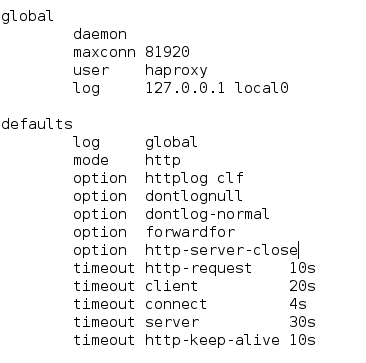
- global
- HAProxy 실행 관련 설정
- defaults
- log 관련 설정
- timeout 관련 설정
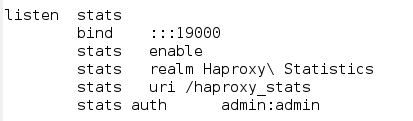
- listen stats
- HAProxy stats 관련 설정
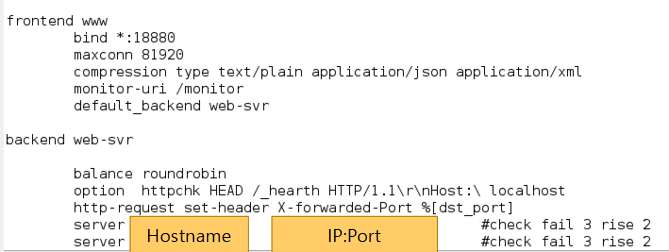
Hostname
- 대상 서버의 hostname
- 예시 : test1 / test2
- 대상 서버의 hostname
IP:Port
- 대상 서버와 어플리케이션의 IP 및 port
- 예시 : 192.168.52.1:8080 / 192.168.52.2:8080
- 대상 서버와 어플리케이션의 IP 및 port
frontend www
- 타 프로그램에서 호출 시 사용되는 port 등 정보 설정
Backend web-svr
Load balancing 타입 및 대상이 되는 서버 설정
Balance 타입
- 일반적으로 사용되는 roundrobin
HAProxy 서비스 등록#
HAProxy 설치 파일 중 examples/haproxy.init 파일을 이용해 등록
서비스 등록을 위한 파일 복사
cp /home/haproxy-1.8.30/examples/haproxy.init /etc/init.d/haproxy권한 부여
chmod 755 /etc/init.d/haproxy서비스 등록을 위한 파일 복사
cp /etc/init.d/haproxy /usr/sbin실행
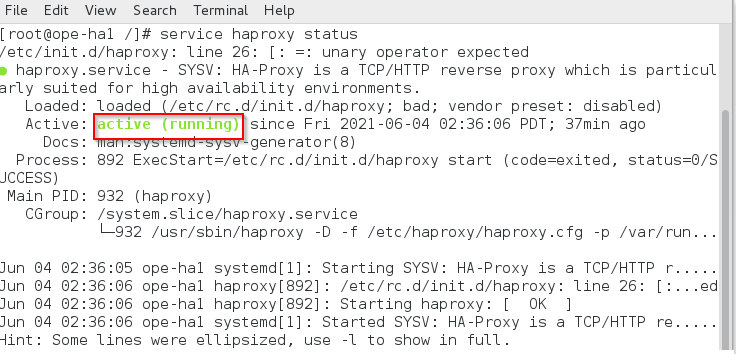
service haproxy start